Building an NSIncrementalStore
January 10, 2015
NSIncrementalStore subclasses provide control over the persistence layer of Core Data and allow you to dictate how entities are stored and deleted, by providing a translation layer between Core Data and your data store. First introduced in 2011 at WWDC, Incremental Stores have been slow to catch on and (historically) difficult to grok. However, the official documentation has gotten much better and great resources have been provided by the community; consider both The future of web services in iOS / Mac OS X and Accessing an API using CoreData’s NSIncrementalStore required reading before implementing your own.
This article discusses how to build an NSIncrementalStore subclass, by starting with a basic store and working up towards a more advanced. There is a companion project on GitHub with all complete example code.
Data Model and Format
For the examples below, we’ll be dealing with data from the COLOURlovers API, but the code can adapted for another data source. We’re really interested in the Core Data mechanics, so the exact API used is not super important. But to make things a little more concrete, imagine the JSON data format looks like this:
{
    "id": 1,
    "title": "My Color Palette",
    "description": "A sample color palette",
    "colorWidths": [
        0.19,
        0.19,
        0.08,
        0.08,
        0.46
    ],
    "colors": [
        "DB343E",
        "030000",
        "E97070",
        "FEBCA3",
        "6E0A0E"
    ]
}
And that the single model entity, a Palette, looks like so:
class Palette: NSManagedObject {

    @NSManaged var id: String
    @NSManaged var name: String
    @NSManaged var username: String

    @NSManaged var colors: [AnyObject]
    @NSManaged var widths: [AnyObject]
}
Remember, this is just an example. Your model could be anything and you should be devise your own mechanism for mapping between the external data source representation and the resulting managed object. For JSON, this might be setting key/value pairs from a dictionary.
A Basic Incremental Store
We’ll start by building a basic Incremental Store with limited caching and synchronous blocking behavior. Our store will load data from a JSON file and return concrete NSManagedObjects. Begin by creating an NSIncrementalStore subclass and implementing the loadMetadata method, setting both the NSStoreTypeKey and NSStoreUUIDKey keys. Because this is Swift code, we need to use the @objc declaration so our subclass is visible from ObjC.
import CoreData

@objc class LocalIncrementalStore : NSIncrementalStore {
    private let cache = NSMutableDictionary()

    class var storeType: String {
        return NSStringFromClass(LocalIncrementalStore.self)
    }

    override func loadMetadata(error: NSErrorPointer) -> Bool {
        let uuid = NSProcessInfo.processInfo().globallyUniqueString
        self.metadata = [NSStoreTypeKey : LocalIncrementalStore.storeType, NSStoreUUIDKey : uuid]
        return true
    }
}
Next implement executeRequest:context:error and handle the .FetchRequestType. If your Incremental Store doesn’t allow saving, then responding only to fetch requests may be enough. However, in a real world implementation you may wish to allow saving back to your store, in which case you should handle .SaveRequestType too. Starting with iOS 8, Core Data adds .BatchUpdateRequestType for executing batch updates.
override func executeRequest(request: NSPersistentStoreRequest, withContext context: NSManagedObjectContext, error: NSErrorPointer) -> AnyObject? {
    if request.requestType == .FetchRequestType {
        let fetchRequest = request as NSFetchRequest
        if fetchRequest.resultType == .ManagedObjectResultType {
            return self.entitiesForFetchRequest(fetchRequest, inContext: context)
        }
    }

    // TODO: handle save

    return nil
}
We are only returning entities for .ManagedObjectResultType, but later we’ll add support for additional types.
Next create the entitiesForFetchRequest method that accepts an NSFetchRequest and NSManagedObjectContext and returns an array of managed objects. The managed objects will be determined by loading data from a JSON file, and doing some simple transforms from NSDictionary to NSManagedObjects.
func entitiesForFetchRequest(request:NSFetchRequest, inContext context:NSManagedObjectContext) -> [AnyObject] {
    var entities: [Palette] = []
    let items = self.loadPalettesFromJSON()

    for item: AnyObject in items {
        if let dictionary = item as? NSDictionary {
            let objectId = self.objectIdForNewObjectOfEntity(request.entity!, cacheValues: item)
            if let palette = context.objectWithID(objectId) as? Palette {
                // set attributes on managed object from dictionary
                palette.transform(dictionary: dictionary)
                entities.append(palette)
            }
        }
    }

    return entities
}
The model data is read from a JSON file into an array of NSDictionary objects. Managed objects are then created from those dictionary objects, corresponding to entities in the store. A helper method objectIdForNewObjectOfEntity is used to insert a new entity and return its objectID. With the objectID, the managed object is retrieved. Values are then set on the managed object from the dictionary representation.
At this point to we have a skeleton implementation, but the code still won’t compile until we need to implement the methods necessary to create an NSManagedObject. First we’ll create the method objectIdForNewObjectOfEntity to return an objectID. We’ll also use a private local variable NSMutableDictionary cache as a very basic way to cache values from the JSON file.
func objectIdForNewObjectOfEntity(entityDescription:NSEntityDescription, cacheValues values:AnyObject!) -> NSManagedObjectID! {
    if let dict = values as? NSDictionary {
        let nativeKey = entityDescription.name
        if let referenceId = dict.objectForKey("id")?.stringValue {
            let objectId = self.newObjectIDForEntity(entityDescription, referenceObject: referenceId)
            cache.setObject(values, forKey: objectId)
            return objectId
        }
    }

    return nil
}
Override newValuesForObjectWithID:context:error from NSIncrementalStore and use it to create a new NSIncrementalStoreNode. An NSIncrementalStoreNode is an opaque data type that Core Data uses to represent data from your data store. Because the exact mechanism of how your data store represents objects is unknown to Core Data, you must use an NSIncrementalStoreNode to wrap your objects, by providing an NSDictionary of key/value pairs.
override func newValuesForObjectWithID(objectID: NSManagedObjectID, withContext context: NSManagedObjectContext, error: NSErrorPointer) -> NSIncrementalStoreNode? {
    if let values = cache.objectForKey(objectID) as? NSDictionary {
        return NSIncrementalStoreNode(objectID: objectID, withValues: values, version: 1)
    }

    return nil
}
And that’s it. While this isn’t much of a real world implementation, we can start to see to how the moving parts fit together. You still need to setup a Persistent Store Coordinator to use your incremental store type, but steps are straightforward. Once your store is part of the stack, you can execute fetch requests in the typical fashion and handle the results
let request = NSFetchRequest(entityName: Palette.entityName)
request.fetchOffset = offset
request.fetchLimit = 30
request.sortDescriptors = Palette.defaultSortDescriptors

var error: NSError?
let result = context?.executeFetchRequest(request, error: &error)
A full example can here seen here
Loading Remote Resources
To modify our store to load remote resources, we can take advantage of NSAsynchronousFetchRequest to load results on a background thread. NSAsynchronousFetchRequest is a new API that was introduced in iOS 8. Again, we’ll start with a naive implementation, looking to keep things on the simple side when possible.
First modify entitiesForFetchRequest:context to so that it calls a helper function fetchRemoteObjectsWithRequest to load remote resources.
func executeFetchRequest(request: NSPersistentStoreRequest!, withContext context: NSManagedObjectContext!, error: NSErrorPointer) -> [AnyObject]! {
    var error: NSError? = nil
    let fetchRequest = request as NSFetchRequest

    if fetchRequest.resultType == .ManagedObjectResultType {
        let managedObjects = self.fetchRemoteObjectsWithRequest(fetchRequest, context: context)
        return managedObjects
    } else {
        return nil
    }
}
The function fetchRemoteObjectsWithRequest will create an NSURLRequest using some parameters from the incoming fetch request. With a request a in hand, a synchronous HTTP request is made and the response data is parsed into model objects. Much of this method is specific to the API endpoint queried, but the basics are the same for most endpoints. You must translate from an NSFetchRequest into an NSURLRequest. After making the request, you must translate again from response data in NSManagedObjects. In my case, this is done inside the transform method on the Palette object.
func fetchRemoteObjectsWithRequest(fetchRequest: NSFetchRequest, context: NSManagedObjectContext) -> [AnyObject] {
    let offset = fetchRequest.fetchOffset
    let limit = fetchRequest.fetchLimit
    let httpRequest = ColourLovers.TopPalettes.request(offset: offset, limit: limit)

    var error: NSError? = nil
    var response: NSURLResponse? = nil
    let data = NSURLConnection.sendSynchronousRequest(httpRequest, returningResponse: &response, error: &error)
    let jsonResult = NSJSONSerialization.JSONObjectWithData(data!, options: nil, error: &error) as [AnyObject]

    let paletteObjs = jsonResult.filter({ (obj: AnyObject) -> Bool in
        return (obj is NSDictionary)
    }) as [NSDictionary]

    let entities = paletteObjs.map({ (item: NSDictionary) -> Palette in
        let objectId = self.objectIdForNewObjectOfEntity(fetchRequest.entity!, cacheValues: item)
        let palette = context.objectWithID(objectId) as Palette
        // use dictionary values to change managed object
        palette.transform(dictionary: item)
        return palette
    })

    return entities
}
Sending the synchronous request above is pretty lazy, but we’re doing things the easy way first. By changing the fetch request executed against the store to an NSAsynchronousFetchRequest, we can move the query to a background thread. This allows us to perform some basic multithreaded queries.
let request = NSFetchRequest(entityName: Palette.entityName)
request.fetchOffset = offset
request.fetchLimit = 30
request.sortDescriptors = Palette.defaultSortDescriptors

let asyncRequest = NSAsynchronousFetchRequest(fetchRequest: request) { (result) -> Void in
    let count = result.finalResult?.count
    if count > 0 {
        // handle results, by reloading table view, etc.
    }
}

var error: NSError?
let result = context?.executeRequest(asyncRequest, error: &error)
A complete example can be found here
Using a Second Persistent Store Coordinator
By using a secondary Persistent Store Coordinator, one that is private to your Incremental Store subclass, you can maintain a local cache of the server state while keeping it up-to-date with the latest server responses. This allows cached responses to be served immediately from the secondary PSC while the real object representation is downloaded over the network.
The secondary PSC is setup inside loadMetadata, with a modified copy of your existing model, where each entity is augmented with an additional attribute for tracking a unique server-side resource id. The name of the attributes should be name-spaced to avoid colliding with existing attributes, for example, with a unique string prefix. This has been referred to as the Augmented Managed Object Model. By augmenting each entity in the model with a server-side resource id, the incremental store can track remote entities and change local entities in response. Each entity can also be augmented with a last modified date for HTTP caching.
The secondary PSC provides quick access to the data store, allowing long running network operations proceeded in another context. The secondary PSC will fulfill all requests to the store, but the objects returned may be ‘shell’ objects until the full representation is retrieved from the network. The custom attributes added to the model entities provide a mapping between the object representations in two contexts.
Here’s a diagram showing at a high level how the primary players are related.
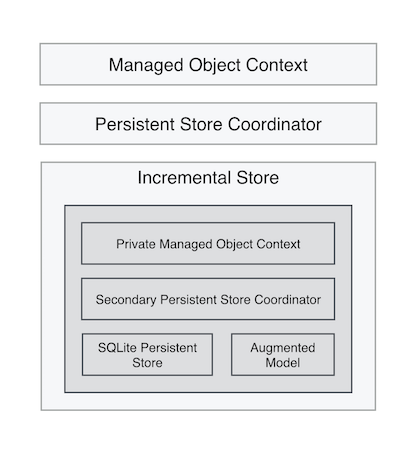
Modifying our basic incremental store to include a secondary PSC requires a bit of work, most related to setting up the Core Data stack. Let’s go over some of the key changes. To begin with, we’ll need to modify our Incremental Store to include a private Core Data stack, which will be used to return results immediately, when possible. Here is how the Augmented Managed Object Model is defined.
lazy var augmentedModel: NSManagedObjectModel = {
    let augmentedModel = self.persistentStoreCoordinator?.managedObjectModel.copy() as NSManagedObjectModel
    for object in augmentedModel.entities {
        if let entity = object as? NSEntityDescription {
            if entity.superentity != nil {
                continue
            }

            let resourceIdProperty = NSAttributeDescription()
            resourceIdProperty.name = kPALResourceIdentifierAttributeName
            resourceIdProperty.attributeType = NSAttributeType.StringAttributeType
            resourceIdProperty.indexed = true

            // could also augment with last modified property

            var properties = entity.properties
            properties.append(resourceIdProperty)

            entity.properties = properties
        }
    }

    return augmentedModel
}()

let kPALResourceIdentifierAttributeName = "__pal__resourceIdentifier_”
First a copy of the model is made. Then each entity of the model is modified to include a new resource id attribute. This attribute will be used to track remote objects with their cached counterparts. Next, with each entity modified, the augmented model is returned, to be used by the secondary persistent store coordinator.
The idea of using two models is a little weird at first. The augmented model is private, and the incremental store is persisting the store to disk in a private context, unexposed to the application. The real model, defined in the Core Data model editor, is persisted and controlled by the server (or by some other means). When cached objects are pulled from the augmented model, they need to be manifested in the real model before consumption by the application. This is done by passing objects IDs between contexts and translating between objects using the augmented resource identifier.
Things begin to get interesting when it comes to executeRequest:context:error. We’ll start by making an asynchronous request to our web service and use the response to create NSManagedObjects sometime in the future. After kicking off the request, we’ll query our secondary PSC and attempt to return cache results immediately. Because the store has two contexts, any objects found in the backing context need to manifested in the main context as well. To do this, we make a copy the original fetch request and modify it to fetch the only the resourceId property (from our augmented model). Once we have all the resource ids for cached objects, we can grab references to managed objects from the main context.
func executeFetchRequest(request: NSPersistentStoreRequest!, withContext context: NSManagedObjectContext!, error: NSErrorPointer) -> [AnyObject]! {
    var error: NSError? = nil
    let fetchRequest = request as NSFetchRequest
    let backingContext = self.backingManagedObjectContext

    if fetchRequest.resultType == .ManagedObjectResultType {
        // asynchronously request remote objects
        self.fetchRemoteObjectsWithRequest(fetchRequest, context: context)

        // create new fetch request for cached resources
        let cacheFetchRequest = request.copy() as NSFetchRequest
        cacheFetchRequest.entity = NSEntityDescription.entityForName(fetchRequest.entityName!, inManagedObjectContext: backingContext)
        cacheFetchRequest.resultType = .ManagedObjectResultType
        cacheFetchRequest.propertiesToFetch = [kPALResourceIdentifierAttributeName]

        // immediately return cached objects, if possible
        let results = backingContext.executeFetchRequest(cacheFetchRequest, error: &error)! as NSArray
        let resourceIds = results.valueForKeyPath(kPALResourceIdentifierAttributeName) as [NSString]

        let managedObjs = resourceIds.map({ (resourceId: NSString) -> NSManagedObject in
            let objectId = self.objectIDForEntity(fetchRequest.entity!, withResourceIdentifier: resourceId)
            let managedObject = context.objectWithID(objectId!) as Palette

            let predicate = NSPredicate(format: "%K = %@", kPALResourceIdentifierAttributeName, resourceId)
            let backingObject = results.filteredArrayUsingPredicate(predicate!).first as Palette

            managedObject.transform(palette: backingObject)
            return managedObject
        })

        return managedObjs
    }
    else {
        return nil
    }
}
First an asynchronous request is made over the network. Then immediately following that, a cached fetch request for resourceIds is created and executed against the backing context. With the resource ids returned, the map function creates managed objects in the main context from the cached ids. These managed objects are returned immediately.
Much of the remaining details involve translating between caching objects and their over-the-wire counterparts, as network requests are fulfilled. On the initial request, without any cached data, objectIDForEntity will return an object id pointing to a shell object— real because it exists in the backing context, but it has no attribute values aside from an object id. When the network request is completed, response objects are mapped onto cached objects, and the full representation of a model object is obtained.
Let’s look at what’s happening inside fetchRemoteObjectsWithRequest.
func fetchRemoteObjectsWithRequest(fetchRequest: NSFetchRequest, context: NSManagedObjectContext) -> Void {
    let offset = fetchRequest.fetchOffset
    let limit = fetchRequest.fetchLimit
    let httpRequest = ColourLovers.TopPalettes.request(offset: offset, limit: limit)

    // make asynchronous request for remote resources
    NetworkController.task(httpRequest, completion: { (data, error) -> Void in
        var err: NSError?
        let jsonResult = NSJSONSerialization.JSONObjectWithData(data, options: nil, error: &err) as [AnyObject]
        let palettes = jsonResult.filter({ (obj: AnyObject) -> Bool in
            return (obj is NSDictionary)
        })

        context.performBlockAndWait(){
            let childContext = NSManagedObjectContext(concurrencyType: .PrivateQueueConcurrencyType)
            childContext.mergePolicy = NSMergeByPropertyObjectTrumpMergePolicy
            childContext.parentContext = context

            childContext.performBlockAndWait(){
                let result = self.insertOrUpdateObjects(palettes, ofEntity: fetchRequest.entity!, context: childContext, completion:{(managedObjects: AnyObject, backingObjects: AnyObject) -> Void in
                    // save child and backing context
                    childContext.saveOrLogError()
                    self.backingManagedObjectContext.performBlockAndWait() {
                        self.backingManagedObjectContext.saveOrLogError()
                    }

                    // find objects in main context and refresh them
                    context.performBlockAndWait() {
                        let objects = childContext.registeredObjects.allObjects
                        objects.map({ (obj: AnyObject) -> Void in
                            let childObject = obj as NSManagedObject
                            let parentObject = context.objectWithID(childObject.objectID)
                            context.refreshObject(parentObject, mergeChanges: true)
                        })
                    }
                })
            }
        }

    }).resume()
}
First an NSURLRequest is build from the fetch request, followed by a network request for the resources in question. After the response comes back and the results are initially parsed out of JSON, it’s time to update the managed objects within the contexts. This includes the private caching context our store uses, and the main context used by the application. There is a bit of work abstracted behind insertOrUpdateObjects, where managed objects are either inserted into the cached context or updated. This involves executing additional fetch requests against the cache to find objects by the reference id on the augmented model.
Where the other to stores execute fetch requests directly against the context, it may be easier to use an NSFetchedResultsController to observe the context and refresh with changes. With a more advanced store containing a second PSC, responding to change notifications with an fetched results controller is easier to manage.
See the complete example here.
Design Guidelines
Here are some design guidelines for implementing Incremental Stores, gathered from Apple documentation, WWDC sessions and community discussions.
- Design for a specific schema rather then trying to account for the general case.
- Use canned queries. Pick a set of predicates to access the data and don’t go overboard.
- Balance I/O and memory usage. Account for the characteristics of your specific store. If your data set is large or network latency is high, then make network requests judiciously.
- Request data in batches; cache locally. If your API supports pagination, utilize then limit and offset parameters on
NSFetchRequestto pull in your dataset in chunks. - Treat the server as the canonical source of truth. As remote resources are requested and local caches are created, avoid an inconsistent state with local and remote data. The server performs writes and provides the truth, no matter what local store claims.
- Be chatty over the network. Make all network requests that need to be made so the server is updated as user performs actions. That’s not to say make numerous network requests by rather design network layer to take advantage of the protocol and communicate all necessary information about a resource.
- Use HTTP Caching Semantics. Configure the server to send back last modified dates or ETags so the network requests can take advantage of NSURLCache. If the server can return 304 for some requests, then resources could be served locally from HTTP cache.
- Implement solid error handling and fail gracefully. Many of the Incremental Store methods accept an
NSErrorPointer. You should use this parameter to communicate any errors back up the stack.
Additional Resources
The Apple WWDC videos from 2011 give a nice introduction to Incremental Stores. The topic is discussed on the iOS and OS X “What’s New in Core Data” videos and while the slides are nearly identical, I find the OS X one to be more in depth.
For a more recent video, see the “What’s New in Core Data” video from WWDC 2014.
The Core Data Release Notes for OS X v10.7 and iOS 5.0 also provide some details on Incremental Stores.
For a real world implementation, it doesn’t get much better than AFIncrementalStore. Although the project is no longer maintained, the development branch still provides a working example of a multi-context store. Much of the Swift code in this article and companion project was inspired by the design of AFIncrementalStore.
There are slides from talk on AFIncrementalStore given at Cocoaheads SF. The slides are worth looking over but sadly the linked audio is no longer available. There is also a Q&A section at the end of “Build an iOS App in 20 Minutes with Rails and AFIncrementalStore” which discusses some concepts in more detail, including how the second persistent store coordinator delivers cached results.
Other real world examples include SMIncrementalStore, ZumeroIncrementalStore, and PFIncrementalStore (also no longer maintained).